

Workspace Stubs#
Add stubs for PHP extensions and frameworks so the editor can provide complete code completion, diagnostics, and IntelliSense for symbols that your project depends on.
Stubs can be obtained in various ways. There are stubs for standard PHP extensions, stubs for well-known PHP native extensions, and stubs for whole frameworks such as WordPress.
Command > Workspace Stubs#
Use the Workspace Stubs command from the Command Palette (F1):
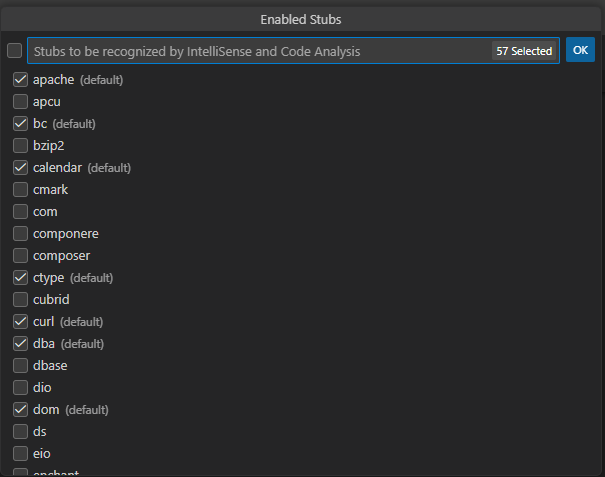
There you can enable or disable stubs for standard PHP extensions and a few additional stubs including WordPress, Composer, and php-amqp.
Workspace Stubs Language#
Most stubs are translated into all major languages including English, German, Spanish, French, Italian, Japanese, Russian, and Chinese. The language is set automatically based on your IDE UI language and can be overridden using the setting "phpTools.language".
Setting "php.stubs"#
The setting "php.stubs" is equivalent to the Workspace Stubs command.
Add Stub Code Action#
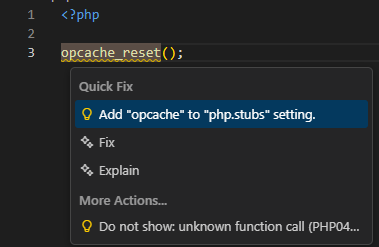
Whenever a function from a stub is not yet included, you can use a code action to include the corresponding stub.
Composer.json ext-#
If you use Composer, composer.json can optionally specify required PHP extensions (see the composer.json schema#require).
The editor respects the require and require-dev sections and automatically includes stubs for the extensions listed there.
Composer Packages#
Various other stubs are available as Composer packages. Add them as development requirements ("require-dev") to your project using the composer: require-dev command.
Custom Stubs#
Additional third-party stubs provided as a .php file with definitions can be placed anywhere inside the workspace. The editor processes the files and uses the containing definitions.