Extract Refactoring#
Extract parts of your PHP code into new functions, methods, constants, or interfaces to improve readability and reuse. These refactorings are available as code actions directly in the editor.
Extract Function#
The extract function refactoring takes a selection of code, moves it into a separate function or method (or constant), and asks for a new function (or constant) name.

- Select a portion of code.
- Open Code Actions using a light bulb icon, or keyboard shortcut (by default
Ctrl + .(Windows) orCmd + .). - Select Extract function.
- Enter a new function name and confirm with
Enter.
Extract Constant#
If you select a constant expression, instead of Extract function, there will be Extract constant code action.
Extract Interface#
Available in
v1.73and newer.
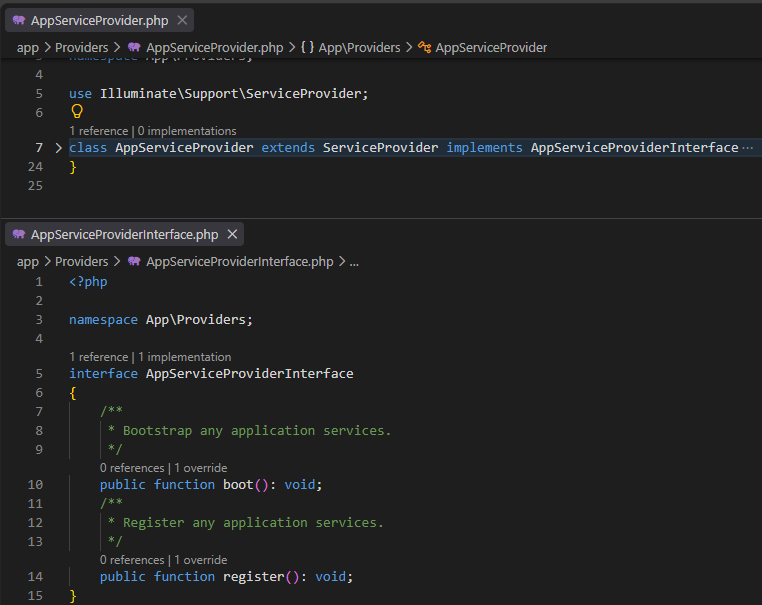
The Extract Interface code action is provided on a class header, if there are public class members that can be placed into an interface.
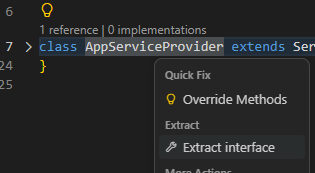
The code action creates a new interface in a new file, with Interface suffix, adds public declarations from the class, copies it's documentary comments, and adds the interface to the selected class automatically.