

MCP Server#
Requires PHP Tools version 1.74 or later.
Available in VS Code-based editors that support the
contributes.mcpServerDefinitionProvidersextension point, including VS Code, Cursor, Windsurf, and Trae.
The PHP extension includes a Model Context Protocol (MCP) server. It exposes tools, skills, and context that compatible AI agents can use to access workspace-aware information from PHP Tools.
MCP Tools#
MCP tools give compatible AI agents access to semantic information about your open workspace. This can help them answer PHP-related questions with more relevant context and reduce the need to search through files manually.
Call Tools without confirmation#
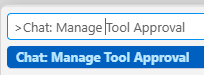
Open Command Palette (F1), and search for Chat: Manage Tool Approval:
- Untick the "Folder" button, so it applies for all your workpaces.
- Tick Run any tool without approval; so agents can run the tool to get extended information and tools for your projects without you confirming every action.
