

Microsoft.NET.Sdk Not Found#
Problem#
When opening a PHP project, the following error appears in the Output window:
The SDK 'Microsoft.NET.Sdk' specified could not be found. ...
Usual Cause#
.NET is a Visual Studio component required to open modern PHP projects.
This component can break after Visual Studio updates, usually when multiple Visual Studio versions are installed side by side. By default, .NET is located in C:\Program Files\dotnet\ (or %ProgramFiles%\dotnet\), and the PATH environment variable points to this location.
However, installing a 32-bit version may alter PATH so it also contains C:\Program Files (x86)\dotnet\, sometimes before the correct C:\Program Files\dotnet\ entry.
Solution 1#
Recommended fix: Remove the x86 alternative C:\Program Files (x86)\dotnet\ (or %ProgramFiles(x86)%\dotnet\) from the PATH environment variable.
Open Advanced System Settings (Windows Settings -> System -> About, then click Advanced system settings).
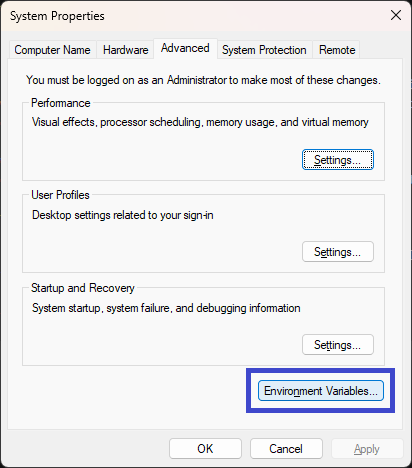
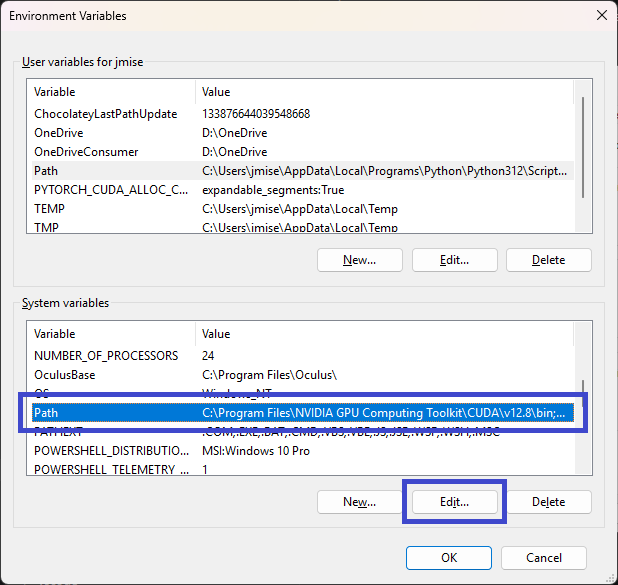
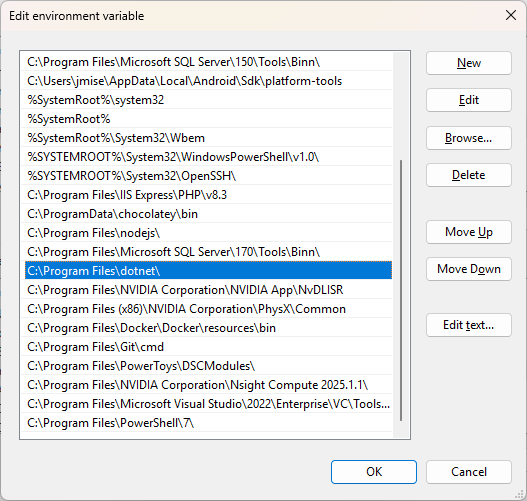
Make sure there is no C:\Program Files (x86)\dotnet\ entry (the x86 alternative).
Click OK, then restart Visual Studio.
Related Links#
- https://learn.microsoft.com/en-us/answers/questions/1184941/the-sdk-microsoft-net-sdk-specified-could-not-be-f
- https://stackoverflow.com/questions/67049414/