

PHP Tools for Sublime Text#
PHP Tools for Sublime Text is provided as a language server (LSP).
Requirements#
- Node.js: nodejs.org/download
- Sublime Text: sublimetext.com
Installation#
Install PHP Tools Language Server as a NPM global tool:
Open Sublime Text and make sure you have installed Package Control and LSP package:
- Tools / Command Palette:
Install Package Control
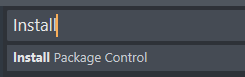
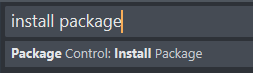
- Tools / Command Palette:
Package Control: Install Package
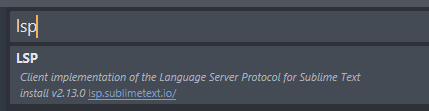
- Search for
LSP:
- You'll see a confirmation in the status bar:

Enable PHP Tools Language Server#
Go to Preferences / Package Settings / LSP / Server Configurations
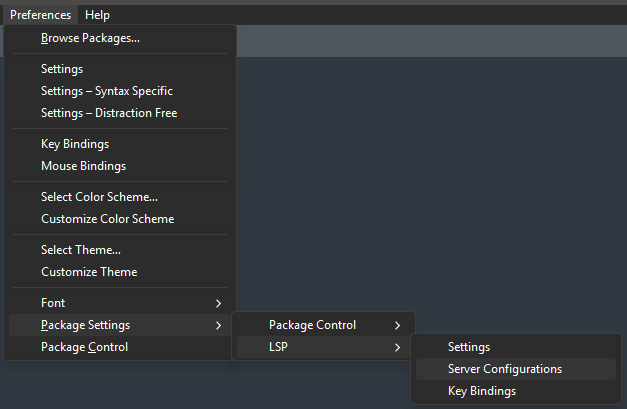
In the newly opened file LanguageServers.sublime-settings, add the following configuration:
{
    "phptools":
    {
        "enabled": true,
        "command": ["devsense-php-ls"],
        "selector": "embedding.php",
        "priority_selector": "source.php",
        "initialization_options" : {
            "0": "<YOUR_LICENSE_KEY>",
            "php.stubs": "*",
            "php.version": "8.5",
            "phpTools.language": "en",
            "php.completion.parameters": "parameters",
            "php.format.codeStyle": "psr-12"
        }
    }
}
Note,
"initialization_options"are optional.
Registration#
Get any license key (both Visual Studio and Visual Studio Code are accepted) on our purchase page.
Insert <YOUR_LICENSE_KEY> in the "initialization_options" above to enable additional premium features including code actions and starred suggestions.
Updating#
To update the language server, update the NPM global tool devsense-php-ls using the command below: